
Zenage LLC · Service notifications
Service texts. Your choice.
Zenage LLC’s US pilot covers service appointment notices and secure service portal invitations. Text consent is optional and is not a condition of purchase or portal access. This program does not include marketing.
The pilot is being prepared. SMS delivery is not yet active. This page explains the consent process; it does not enroll you in text messages.
Choose how to opt in
You can give an affirmative verbal answer to authorized service staff or use the optional form in your invited service portal. Providing a phone number alone does not opt you in.
Verbal consent
Staff read this disclosure, offer the SMS privacy policy and SMS terms, then ask whether you agree:
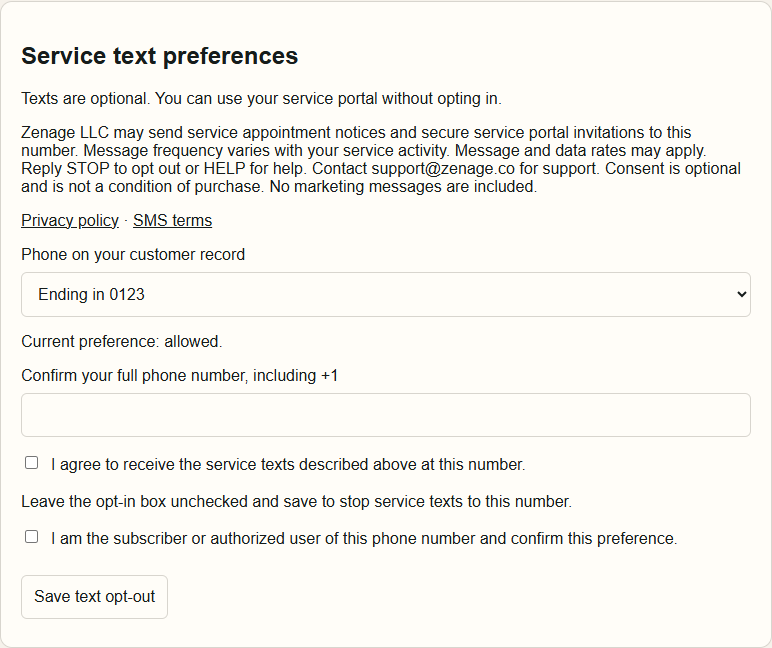
Zenage LLC may send service appointment notices and secure service portal invitations to this number. Message frequency varies with your service activity. Message and data rates may apply. Reply STOP to opt out or HELP for help. Contact [email protected] for support. Consent is optional and is not a condition of purchase. No marketing messages are included.
Staff ask: “Do you agree to receive these service texts at your phone number?” They confirm the number with you and record an affirmative answer, when it was given, who recorded it and an evidence reference. Consent is never inferred from silence.
Customer portal form
- Open your service portal invitation and sign in with the intended verified account.
- Select your masked phone record and enter the complete matching number.
- Read the disclosure, privacy policy and SMS terms. Check the optional consent box and confirm that you are the subscriber or authorized user of the number.
- Select Save text opt-in. The boxes start unchecked. Portal access remains available if you choose not to opt in.
Stop messages or get help
Once messaging is active, reply STOP to opt out or HELP for help. You can also choose Save text opt-out in your service portal or contact [email protected]. An existing opt-out is preserved; submitting a new form does not silently clear it.
Message frequency varies with service activity. Message and data rates may apply. Read the SMS terms and SMS privacy policy.